¶ ArtNET Audio Analyzer
¶ Overview
The Art-Net Audio Analyzer eliminates the need for long, cumbersome analog audio cable runs to trigger lighting cues. By converting audio signals into Art-Net data over a standard network, you can trigger your Avolites Quartz (or any Art-Net compatible console) simply by plugging into the nearest network switch.
¶ Hardware Requirements
The software is designed to run on a Raspberry Pi equipped with a dedicated audio interface. For a professional, standalone build, the HiFiBerry ADC XLR module is recommended. This HAT (Hardware Attached on Top) stacks directly onto the Pi and provides balanced XLR inputs, making it ideal for integration into professional touring or venue environments.
¶ Installation & Setup
- Install a fresh version of Raspbian on your Raspberry Pi.
- Clone the repository:
git clone https://github.com/Infinity553/Audio_Analyzer. - Run the
Install.shscript. - Access the web interface at
http://<yourPi_IP>:8050.
Tip: To skip typing the port number, change the port to 80 in app.py before running the installer.
- Within the UI, select your Audio Interface, Sample Rate, and Buffer Size (default values are typically sufficient).
¶ Configuration
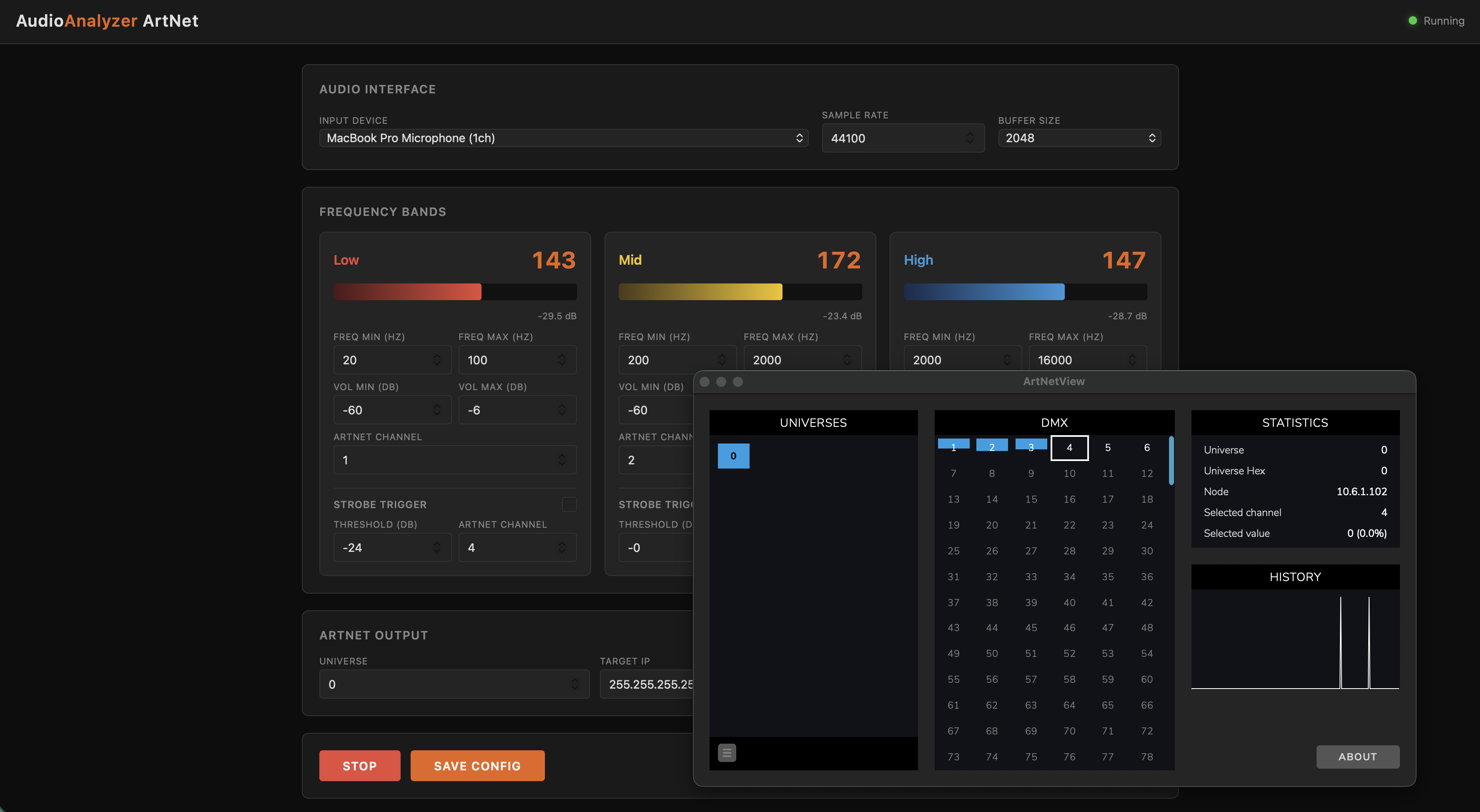
- Networking: Set your desired Art-Net Output Universe. You can choose between Unicast (for a specific console IP) or Broadcast (to allow multiple consoles on the same network to receive the trigger data).
- Frequency Mapping: The three analysis channels are fully customizable. You can adjust the frequency bands and volume sensitivity to match the specific elements of the audio track you wish to track.
- Channel Output By default, the analyzer outputs 6 Art-Net channels (2 for each of the 3 frequency ranges):
- Analog (0–255): Provides a continuous value corresponding to the real-time volume of the frequency band.
- Digital (0 or 255): Acts as a threshold trigger. This channel flips between 0 and 255 depending on whether the volume exceeds or falls below your defined threshold.
¶ Suggestions
- Network Stability: If you use Broadcast on a busy network, ensure your lighting network is on a dedicated VLAN to avoid flooding other devices with Art-Net traffic.
- Latency: Ensure your Pi is connected via Ethernet rather than Wi-Fi to keep the "Analog" 0–255 values as responsive as possible for smooth dimming effects and the digital ones in sync with the beat.

Screenshot